
Create local FTP
(Demo in webinar Link for Users - 20 minutes in the webinar)
In Link SaaS you can easily create a new FTP account out of the box. It’s created on Bizbrains' FTP-server.
In Link OnPrem it is just as easy when your own FTP-server has been set up for it.
It’s done on the partner under Tab Ftp:
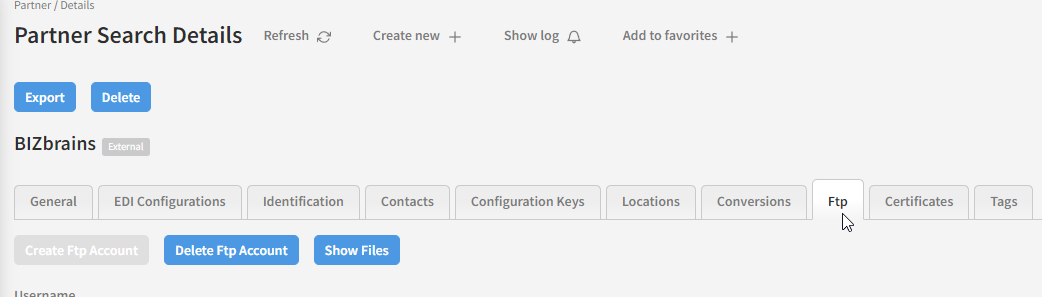
It’s described how to in Link User Guide: Ftp
Receive documents from your partner on local FTP
When the local FTP is set up documents placed in the ToLink folder or subfolders under ToLink will be picked up automaticly by Link. When Link picks it up it will search for distributions with this transport location.
This is standard. If documents should not be picked up automaticly - if the FTP is only for sending or there is something not standard about the incoming - the “Exclude from LocalFTP” should be checked.
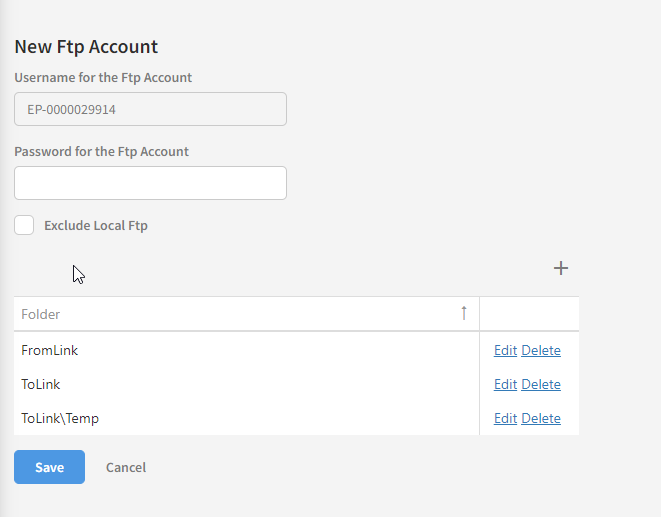
If not standard, an “Incoming transport location” should be set up under the menu “Transport”. An example of a deviation from standard could be not standard formats as CSV where you need to specify what is received under “Init configuration” - See Link User Guide Init configuration
Local FTP for sending documents to your partner
If your partner should pick up documents in the local FTP, this should be set up in Menu Transport.
If you agree on Standard: That the documents are placed in folder FromLink, you are ready to go when it has been created in Transport.
If you agree on other folders than standard, the special setup should be done under the partner - Tab Locations:
