
Purpose
The purpose of advanced HTTP handlers is to provide Link developers the ability to expose web endpoint containing custom business logic with exposed documentation for transparancy. Use cases for this could be (but certanly not limited to):
-
Need to expose an API method that is not exposed out of the box in Links public API
-
Need to receive EDI document from a trading partner and only submit it to Link if it meets certain agreed opon requirements.
How
To implement an advanded HTTP handler you can create a class that inherits Bizbrains.Link.Base.AdvancedHttpHandlerBase<T> from package Bizbrains.Link.Base. It follows the same pattern as Links other assembly artifacts where there is an associated class representing a configuration (implementing ILinkConfig interface) as well as a step factory (ILinkStepFactory interface or LinkStepFactoryBase class).
In the artifact implementation it is possible to map a number of API endpoints using a range of different HTTP verbs like GET, POST PUT etc. Is is possible to map parameters based on the following sources from the HTTP request:
-
Body
-
Route arguments
-
Query arguments
-
HTTP headers
When implementing the artifact by inheriting the AdvancedHttpHandlerBase<T> class, you need to override the method ConfigureHandler where you can do endpoint mappings based on supplied parameter of type IHttpHandlerConfiguration. Endpoints mapped by invoking the appropreate method on IHttpHandlerConfiguration with a route (string) and a delegate. The delegate will be invoked when the endpoint is called.
Example:
public override Task ConfigureHandler(IHttpHandlerConfiguration handlerConfiguration, MyAdvancedHttpHandlerConfig config)
{
    handlerConfiguration.MapGet("/hello-world", () => "Hello World!");
    return Task.CompletedTask;
}
Delegate implementation
The suppied delegate will be invoked whenever the API endpoint is called. The delegate can be both asynchronous as well as syncronous. Whatever object the delegate returns will be json serialized and returned as the request body by default. Unless the delegate takes over the responsibility of writing the response body. Which it can do by injecting HttpContext object and writing to its Responce object. In that case whatever object returned by the delegate will be ignored. Example:
handlerConfiguration.MapGet("/get-custom-response", async (HttpContext httpContext) =>
{
    httpContext.Response.StatusCode = 200;
    httpContext.Response.ContentType = "text/plain";
    await httpContext.Response.WriteAsync("This is a custom response");

    // This response will be ignored, since we have already written the response directly to the HttpContext.Response object,
    // and returning a value from the handler function is not necessary in this case.
    return new { text = "Please ignore me" };
});
Parameters
The following types have built-in support, and does not need any mapping logic in order to be a parameter for the delegate:
-
HttpContext
Can be used to set any headers for http response. But as soon as any writing to the http response body is performed, the responsibility of building the reponse payload is shifted, and the delegates return value is ignored (if there is any). -
CancellationToken
Can be used to stop processing, if cancellation is requested by the client. -
Associated ILinkConfig object
This is the type T in AdvancedHttpHandlerBase<T>. This means that the step configuration associated with the http handler can be provided to the delegate, which can be usefull anywhere that you want to implement configuration dependant logic in your delegate. -
ILinkRetrieveProvider
Available in Link releases newer than 3.0.9669.15068
Can be used to publish messages in Link, where the documents will be published with a transport log file containing logs gathered from the execution of the current http handler.
All other parameters needs to be mapped to the http request. The following snippets show examples of how to do various parameter mappings.
// Map the most simple get endpoint without parameters or documentation
// This returns a simple anonymous object with a test property, which will be serialized to JSON by default
handlerConfiguration.MapGet("/simple", () => new { test = "Test result" });


// Map an async endpoint to demonstrate that async handlers are supported as well
handlerConfiguration.MapGet("/simple-async", async () =>
{
    await Task.CompletedTask;
    return new { test = "Test result" };
});


// Map an endpoint with a route parameter and demonstrate that it can be used in the handler function
handlerConfiguration.MapGet("/routing/{arg}", ([RouteParam] string arg) => new { test = arg });


// Map an endpoint with a route parameter that has a different name than the parameter in the handler function, and demonstrate how to use the RouteParam attribute to bind them together
handlerConfiguration.MapGet("/routing2/{route-arg}", ([RouteParam(Name = "route-arg")] string arg) => new { test = arg });


// Map an endpoint with a body parameter and demonstrate that it can be used in the handler function
handlerConfiguration.MapPost("/map-body", ([BodyParam] MyRequestObject req) => new { test = $"Hello {req.name}" });


// Map an endpoint with a query parameter and demonstrate that it can be used in the handler function
// This parameter is required by default, so if you try to call this endpoint without providing the 'q' query parameter, it will return a 400 Bad Request response
handlerConfiguration.MapGet("/map-query", ([QueryParam] string q) => new { test = $"q: {q}" });


// Map an endpoint with an optional query parameter by setting IsRequired to false, and demonstrate that the handler function can handle the case when the parameter is not provided (it will be null in that case)
handlerConfiguration.MapGet("/map-query2", ([QueryParam(IsRequired = false)] string q) => new { test = $"q: {q}" });


// Map an endpoint with a body parameter that has a different name than the parameter in the handler function, and demonstrate how to use the BodyParam attribute to bind them together
handlerConfiguration.MapGet("/map-query3", ([QueryParam(Name = "query-param", IsRequired = false)] string q) => new { test = $"query-param: {q}" });


// Map an endpoint with a header parameter and demonstrate that it can be used in the handler function
// This parameter is required by default, so if you try to call this endpoint without providing the 'h' header, it will return a 400 Bad Request response
handlerConfiguration.MapGet("/map-header", ([HeaderParam] string h) => new { test = $"h: {h}" });


// Map an endpoint with an optional header parameter by setting IsRequired to false, and demonstrate that the handler function can handle the case when the parameter is not provided (it will be null in that case)
handlerConfiguration.MapGet("/map-header2", ([HeaderParam(IsRequired = false)] string h) => new { test = $"h: {h}" });


// Map an endpoint with a header parameter that has a different name than the parameter in the handler function, and demonstrate how to use the HeaderParam attribute to bind them together
handlerConfiguration.MapGet("/map-header3", ([HeaderParam(Name = "header-param", IsRequired = false)] string h) => new { test = $"header-param: {h}" });


// Map an endpoint that demonstrates how to write a custom response directly to the HttpContext.Response object, which allows for more control over the response (e.g. setting custom status codes, headers, etc.)
// There is no need to set any attributes on the HttpContext parameter, since this type is recognized by the framework and will be automatically injected with the current HttpContext when the handler function is called
handlerConfiguration.MapGet("/get-custom-response", async (HttpContext httpContext) =>
{
    httpContext.Response.StatusCode = 200;
    httpContext.Response.ContentType = "text/plain";
    await httpContext.Response.WriteAsync("This is a custom response");

    // There is no need to return anything from this handler function, since we have already written the response directly to the HttpContext.Response object.
    // If we did return something, it would be ignored in this case.
});


// Map an endpoint that demonstrates how to access the handler configuration object in the handler function,
// which can be useful for accessing custom configuration values defined in the MyAdvancedHttpHandlerConfig class.
// In this example MyAdvancedHttpHandlerConfig is the T in AdvancedHttpHandlerBase<T>,
// and does not need to have any attributes applied to be mapped as a parameter in the handler function,
// since it's mapping is handled by the framework based on the generic type parameter of the AdvancedHttpHandlerBase class.
handlerConfiguration.MapGet("/get-step-config", (MyAdvancedHttpHandlerConfig config) =>
{
    return config;
});


// Map an endpoint that demonstrates how to use the CancellationToken parameter to handle request cancellation.
// There is no need to set any attributes on the CancellationToken parameter, since this type is recognized by the framework
// and will be automatically injected with the appropriate CancellationToken that is triggered when the request is cancelled (e.g. when the client disconnects).
handlerConfiguration.MapGet("/map-cancellation-token", (CancellationToken cancellationToken) => cancellationToken.ThrowIfCancellationRequested());
Return types
The return type can be any object that is json-serializable. If no object is returned by the delegate the http response body will be empty.
Request body validation
When a defined class is used as parameter mapped to the request body, the request body will be validated according to the class definition if the same fasion as ASP.net MVC controller. See the following example:
public class  MyRequestObject
{
    // This property is required by default, so if you try to call the endpoint that uses this object
    // without providing a value for this property, it will return a 400 Bad Request response
    // Empty strings are also considered invalid values for this property, so if you provide an empty string, it will also return a 400 Bad Request response
    [System.ComponentModel.DataAnnotations.Required]
    public string? name { get; set; }


    // This property is optional, so you can call the endpoint that uses this object without providing a value for this property, and it will work fine
    // However, if you do provide a value for this property, it must not exceed 100 characters in length, otherwise it will return a 400 Bad Request response
    [System.ComponentModel.DataAnnotations.MaxLength(100)]
    public string? desctiption { get; set; }


    // This property is required and must contain at least one element, so if you try to call the endpoint that uses this object without providing a value for this property,
    // or if you provide an empty array, it will return a 400 Bad Request response
    [System.ComponentModel.DataAnnotations.Required]
    [System.ComponentModel.DataAnnotations.MinLength(1)]
    public string[]? notes { get; set; }
}
One thing to note is that, if the class mapped to the http request body is nullable aware (built with nullability check enabled), then all properties not marked as nullable will be treated as required by the validator.
Error handling
If an error is detected, and there is a need to stop processing, and return an error message to the client, the following exception can be utilized: LinkWebApiException. When this exception os thrown, the framework uses this as basis to construct the http response sent back to the client.
It’s constructor takes the following parameters:
-
statusCode: System.Int32
This will be the status code returned to the client. -
responseObject: System.Object
This is optional. If argument is provided, then the object will be serialized and used as the reponse body. If not provided a standard json message containing status code and error description will be returned. -
message: System.String
While this argument is technically optional, it should be provided. Not providing this argument will result in the exception raised having an empty Message property. The provided value will be contained in the http response body, if parameter responseObject is not provided. -
innerException: System.Exception
This is optional. Whenever an error is raised on the basis of a caught exception, the best practice if to provide the caught exception here. It can be useful for diagnostic purposes.
Examples:
// This demonstrates how to return a standard error response with a specific status code and message by throwing a LinkWebApiException with the appropriate parameters.
handlerConfiguration.MapGet("/return-standard-error", () =>
{
    throw new LinkWebApiException(418, message: "I'm a teapot");
});

// This demonstrates how to return a custom error response with a custom status code, message, and response body by throwing a LinkWebApiException with the appropriate parameters.
handlerConfiguration.MapGet("/return-custom-error", () =>
{
    throw new LinkWebApiException(418, responseObject: new { error = "Error was: I'm a teapot" }, message: "I'm a teapot");
});
Providing documentation
Meta-data for documentation can be provided by utilizing the IHttpHandlerEndpointConfiguration object returned by the mapping methods of the provided IHttpHandlerEndpointConfiguration object. This can be done in a chaned fashion as demonstrated by the following example:
// Demonstrates how to use the documentation configuration to add rich documentation for an endpoint, which will be shown in the generated API documentation.
handlerConfiguration.MapGet("/say-hello/{name}", ([RouteParam] string name) => new MyResponseObject { responseMessage = $"Hello {name}" })
    .ConfigureDocumentation(doc =>
    {
        doc.AddSummary("Say hello to the client");
        doc.AddDescription("Receives a name from the client, which is used to ro return a 'Hello' message");
        doc.ConfigureParameters(parms =>
        {
            // Route parameter declared. Similar methods are available for query and header parameters as well.
            parms.AddRouteParameter("name", "Used to address the client by name");
        });
        // Declares a response example for status code 200 based on the MyResponseObject class, which will be shown in the documentation.
        // The framework will automatically generate an example response based on the structure of the MyResponseObject class.
        doc.AddGeneratedResponse(200, "Successful response", typeof(MyResponseObject));
        // Declares a concrete response example for status code 418, which will be shown in the documentation.
        doc.AddResponse(418, "I'm a teapot response", new { error = "Error was: I'm a teapot" });
    });
Configuration
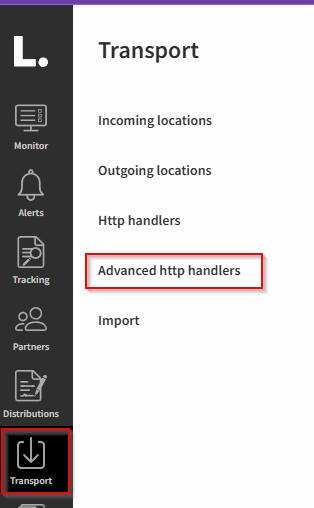
Once an artifact is compliled and deployed to Link it can be configured in the Link UI at “Transport” → “Advanced HTTP Handlers”
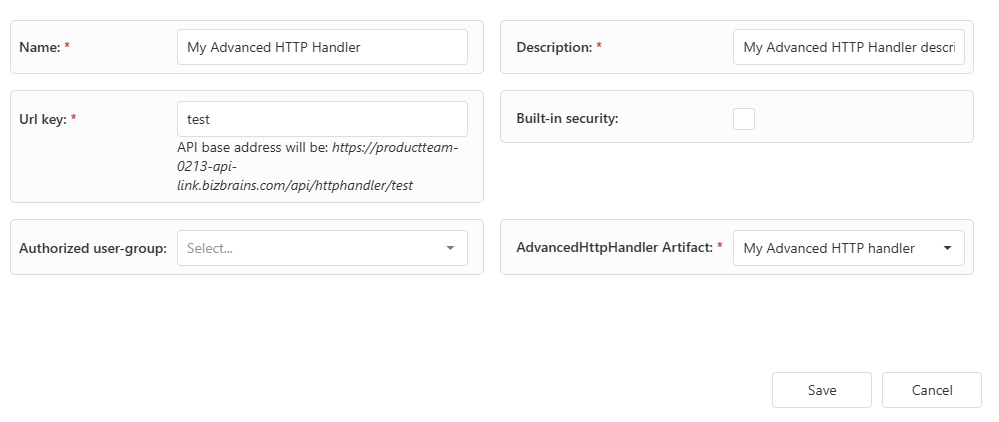
Name
A locical name for this instance of the http handler. This name will also be the name of section in the documentation where the http handler is described.
Description
Can contain a description. Has no technical effect.
Url key
A key that needs to be unique for each registered http handler. This key will be a part of what will be considered the base url for the http handler.
Build-in security
When this option is enabled, standard Link authorization will be applied. Meaning that a http request will be rejected if a Link user is not authenticated. A Link user can be authorized with a personal access token (PAT) (which can be generated under the user in the Link UI) or by using OAuth2 authentication flow.
Please note that if a user-group is selected in the field “Authorized user-group” then this field will be handled as implicitly enabled.
Authorized user-group
If there is a need to finegrain witch users is authorized to invoke the current http handler, a user group can be assigned here. If a user-group is assigned then only users that are members of that user-group can be authorized to invoke this handler. User-groups can be created in the Link UI.
AdvancedHttpHandler Artifact
Here the artifact implementation is selected. When selecting an artifact additional fields can become present based on the associated ILinkConfig type.
Accessing API documentation
The swagger documentation of Links APIs can be viewed at https://<your-name>-api-link.bizbrains.com/api/swagger
Each registered HTTP handler will be represented as its own selectable definition in the documentation.