
Overview
Distribution filters were introduced in version 3.0.9704.14626.
Filters let you apply additional conditions to a distribution. When filters are configured, Link only applies the distribution if the message meets the configured criteria.
Why this exists
In Link, multiple distributions can match the same document type, sender, and receiver. When this happens, Link duplicates the message and creates one document for each matching distribution.
Distribution filters make it possible to process a message with only the relevant subset of matching distributions, based on the message content.
How filters work
Filters are based on context properties. A filter can require a specific context property, in a specific namespace, to be present and have one of the accepted values.
When multiple context-property criteria are configured on a distribution, all criteria must be met. For each property, you can define a list of accepted values.
Note that if a distribution is explicitly configured on a init-configuration, then these criteria will not be evaluated. Since it is clearly the intention that this distribution should be applied.
Configuration
Configure distribution filters in the advanced section of the distribution.
Example
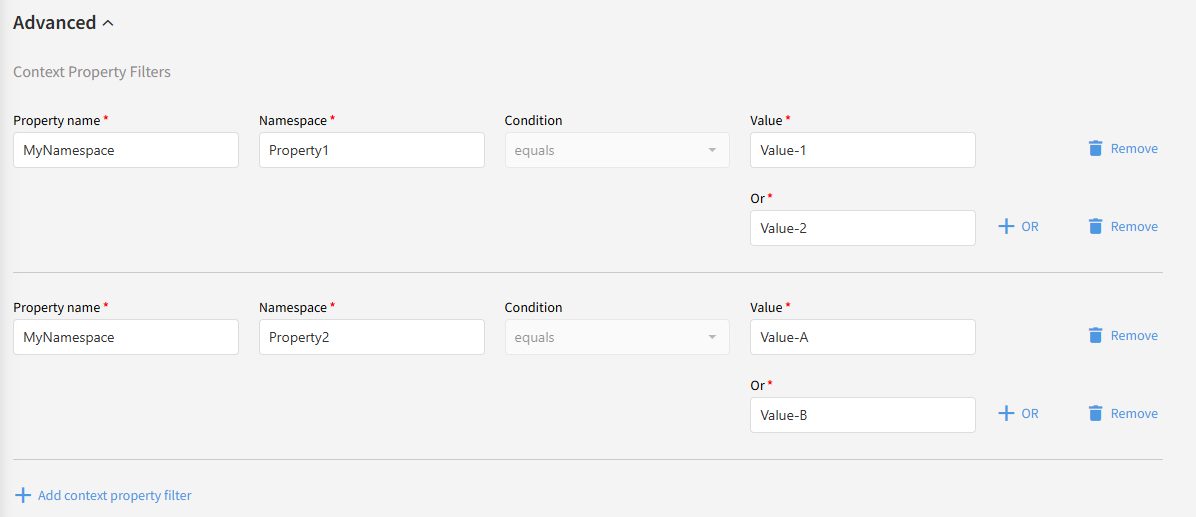
The example below requires the message to meet both of the following conditions:
-
Property1 in the MyNamespace namespace must be present and have the value Value-1 OR Value-2.
-
AND Property2 in the MyNamespace namespace must be present and have the value Value-A OR Value-B.
Use case
An ERP system sends sales orders that can be either new orders or updates to existing orders. Trading partners may need to receive new orders and order updates in different formats or at different locations.
In this case, create one distribution for new orders and another distribution for updates. To prevent Link from processing the same ERP message as both a new order and an update, apply filters to each distribution.
A common approach is to use XML promotions in Link to promote a context property from the input message that indicates whether the message is a new order or an update. The distribution filters can then evaluate that property and apply only the relevant distribution.