
Link uses database sequences to manage counters for various purposes, including internal partner IDs, message numbers, and other built-in functionality.
You can also create custom sequences for other purposes. For example, you can configure a partner-specific counter for generating document numbers. This works automatically for EDIFACT and X12 messages, but the sequence can also be used in maps.
Partner-specific interchange counters are configured under Partner Details → EDI Configurations → “Use specific Interchange Number”.
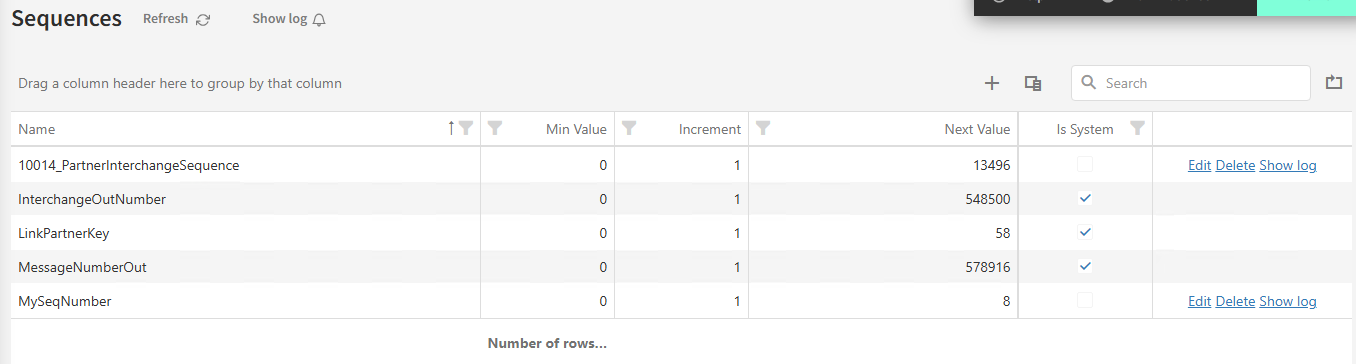
Once configured, the custom interchange counter appears under Sequences with a name such as 10014_PartnerInterchangeSequence, as shown below.
Normally, you manage the current number from the partner page. However, if you need to change more advanced settings, such as the increment or maximum number, you must do so from the Sequences page.
The number prefixed to the sequence name is the internal partner ID. This ID can also be found in the URL on the partner details page.
You do not need to create a sequence before using it. If a sequence is requested that does not already exist, a new sequence is automatically created with the specified name. The sequence starts at 1 and uses an increment of 1 by default.
Managing Sequences
Under the “Settings” menu you can view and manage sequences. You will be presented with a list of sequences on the system. You can see the following information:
-
Name
-
This is the name of the sequence. This will also be the value used to access the sequence programmatically.
-
-
Min value
-
This is the lowest possible value for the sequence. With a small caveat. When you create or update a sequence, “Next Value” must be at least one incremement larger than minimum value.
If the sequence reached the maximum number, the sequence will cycle back to the minimum value.
-
-
Increment
-
This is the value the sequence grows each time a new number i pulled.
-
-
Next value
-
This is the next value to be pulled from the sequence.
-
-
Is System
-
This is a mark for sequences used by LINK it self. These can’t be modified.
-
-
Max Value (hidden)
-
This column show the maximum value for the sequence. To view this column, add it from the column chooser. The default value is very large, and should in most scenarios be unreachable.
-
Usage
To use a macro you access it through a macro for sequences. The syntax for this can be found in the documentation for macros.